
Service Mesh
A Service Mesh is a dedicated infrastructure layer built into an application that controls pod-to-pod communication in a microservices architecture. It delivers fine-grained control for the delivery of application requests to other applications, performs load balancing, encrypts data among many other vital features.
A Service is denoted as a Kubernetes Service object.
An Application is a collection of components (Deployments, Cronjobs) deployed in a unit within a single GAP yaml.
The
istio-proxyalso knows asEnvoyproxy is the sidecar attached to your application once it’s meshed.
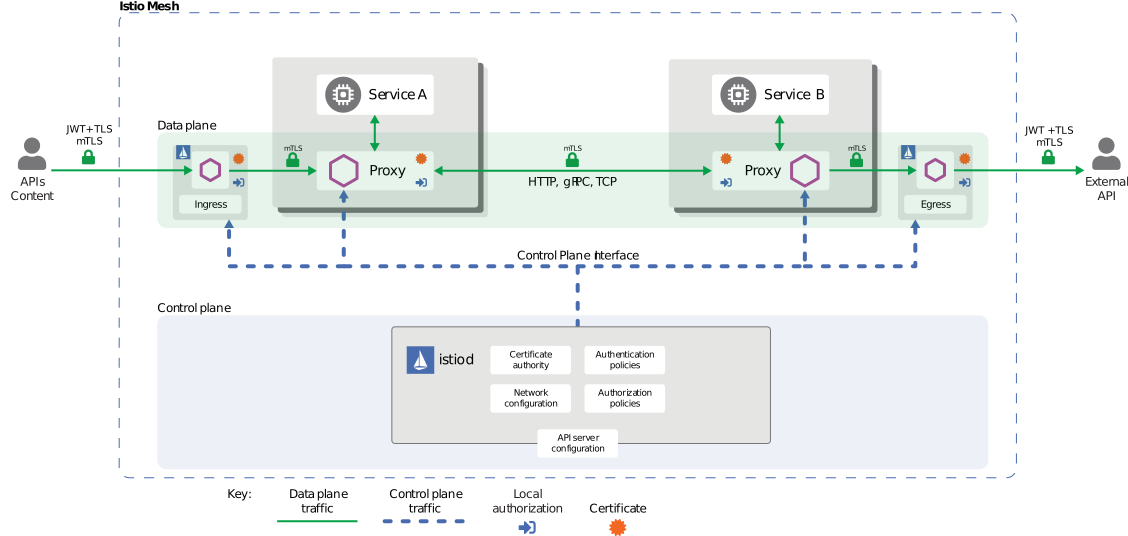
Head over to the enrollment page to learn how to enable the Service Mesh for your Application.
- hook in sidecars ‘useServiceMesh’ flag
- use pod-to-pod calls for cluster-internal communication
- authorization policy setup
- SAP Security standards (SEC-218, SEC-374) mandate that pod to pod communication must be encrypted
- Authorization (SEC-248) for application to application communication is maintenance heavy (application level - escher, cluster level - network policies)
- In-cluster requests have to go through the NGINX ingress (ingress-nginx) controller to get HTTP access logs and metrics (compliance)
- Missing proper observability to see application dependencies via network topology
- Rate limiting is limited using the ingress-nginx and implementing in the application is costly
Pod to pod encryption
- Connections are automatically wrapped with mutual TLS (server + client certificates) to secure pod-to-pod communication.
Access control
- Network level access policies
- Internal SPIFFE Identity Server that allows verifiable IDs (through certificates) to remove the need for application level authentication
- Network level access policies
Features
- Better control traffic via routing rules
- Greatly improved visibility in the clusters with network topology.
- Access logging within the pod
- Request & connection level metrics from the pods (L4, L7)
- Boost resiliency with features such as timeouts, retries, rate limiting and fault injections
Additional benefits
- Trace-id automatically generated or propagated (see Future Improvements section).
- Introducing Service Mesh offers benefits for multiple current and future business critical projects (see Supporting business critical projects section).
You can find the UI for Istio here for staging and for production.
You can find more in depth information about the implementation in the ADB document
Check out the UI for the Service Mesh here for staging and for production.
If you go to the Traffic Graph page (left side menu), you can select your namespace and see all the detailed traffic of your meshed applications.
There are multiple kinds of graphs that can be viewed, e.g App graph displays it with individual apps clustered together in a namespace, as can be seen in the below example.
With the Display dropdown menu, you can further customize the graph to your needs.
It should be noted that the closed locks on the edges of your applications graph if Security option is selected in the above said menu, means mTLS is in effect, and no locks means otherwise. Here is an example:
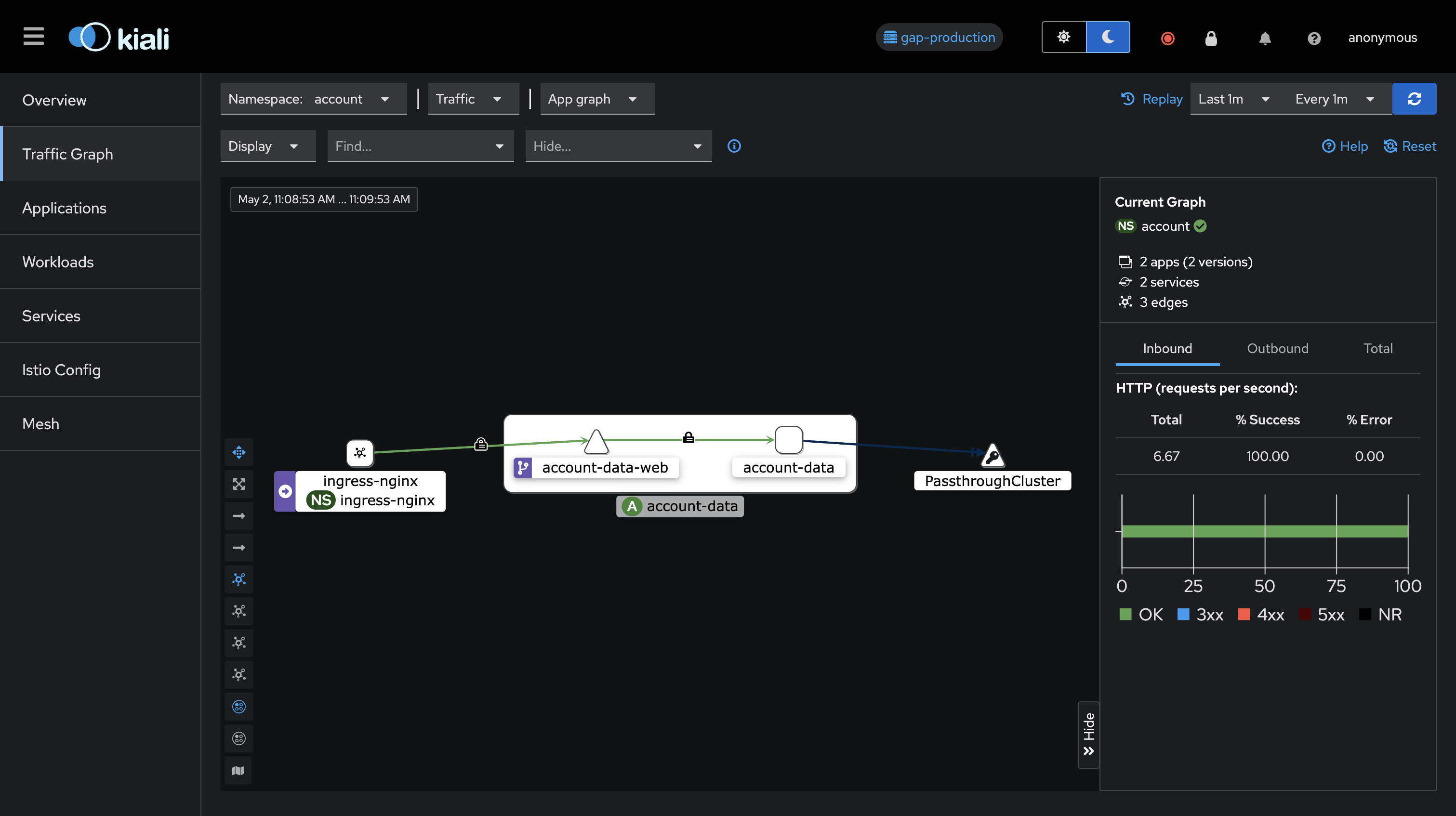
More information on the topology can be seen in the Kiali documentation
To see which applications are meshed or not in a namespace, you can view the Applications page (left side menu) with a namespace selected on the top. An unmeshed application will have the Missing Sidecar status on the right as seen on the example below.
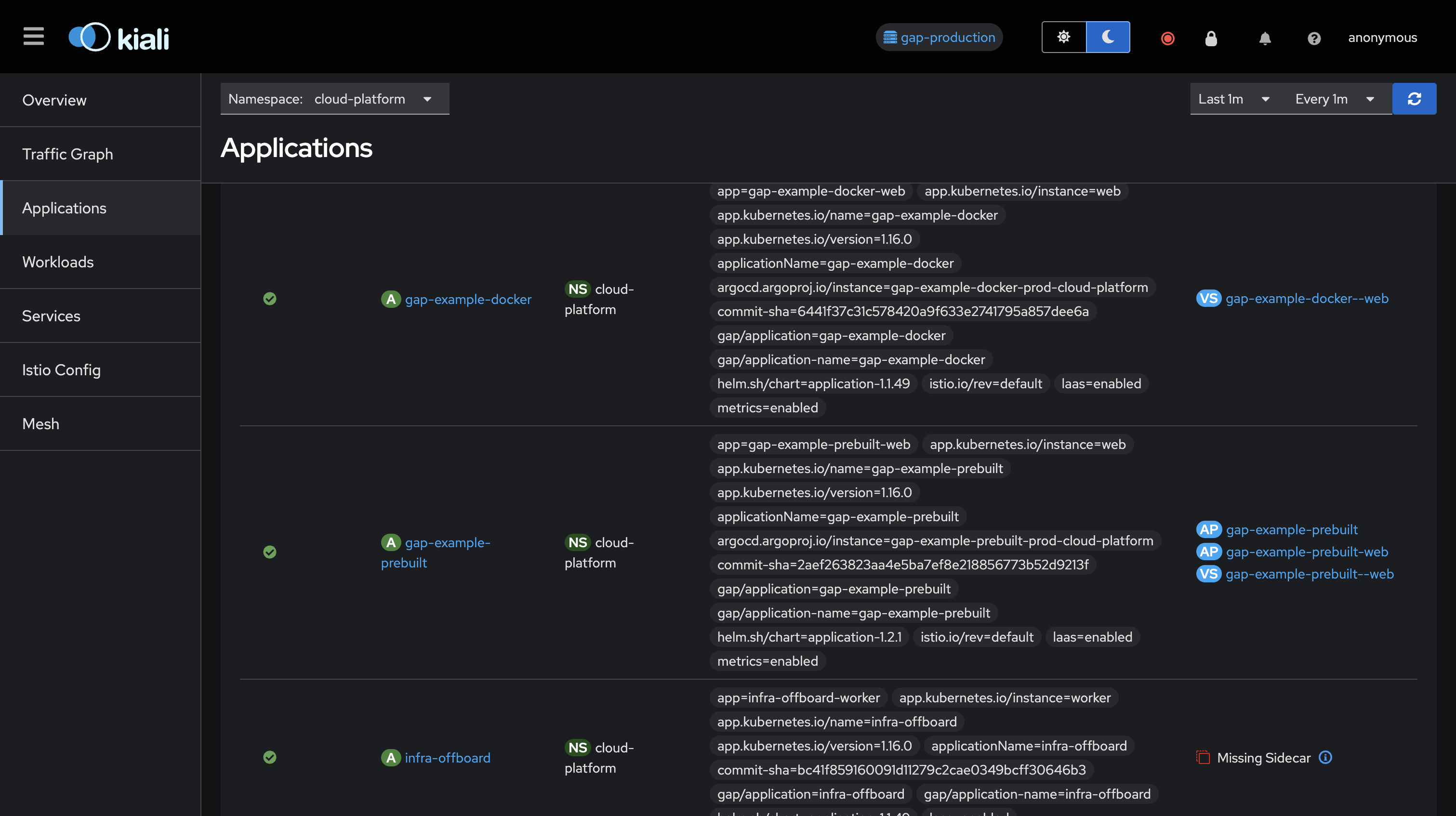
One of the features to know about is the mTLS communication between your applications which is one of the main features of the Service Mesh to satisfy the Security requirements about encrypted communication. You can observe this feature being used through the Service Mesh UI by your applications’ traffic having a closed lock on the edges of the graph as described in the above section. You can ensure that mTLS is being used by using internal application calls as detailed here.
For further information about the mTLS setup in the Service Mesh, please refer to the mTLS and authorizations docs.
For more in depth information about mTLS itself in Istio, you can check out the blog post from Istio featuring mTLS
In some use cases it may be desirable for some components of an application to not be enrolled to Service Mesh. To facilitate this, we now offer an option to selectively disable
Service Mesh for deployment, cronJob, preDeploy and postDeploy components.
To selecitvely disable the meshing of one such component, set useServiceMesh to false at the root level of the desired component (deployment, cronJob, preDeploy or postDeploy).
Example:
name: <your-app-name>
namespace: <your-teams-namespace>
useServiceMesh: true
cronJobs:
  <your-cronjob-name>:
      useServiceMesh: false
      schedule: <your-cron-expression>
      command:
        - <your-command-to-run>
      activeDeadlineSeconds: 60
Note that this feature can only be use to selectively disable the meshing of some components, and CANNOT be used to selectively enable the meshing of some components while useServiceMesh is not set or set to false at root level in gap.yaml. In case of such a setting, GAP will throw a validation error at build time.
Detailed information on the above can be found in this docs.
Please refer to Istio’s troubleshooting docs.
As mentioned here from the above docs, best way to understand what the issue may be with the requests passing through Envoy might be to check Envoy’s response flags in the logs of your application’s istio-proxy sidecar, denoted in the logs as router.envoy_flags.
Also feel free to reach us out at #infra-support on Slack.